2026 Android User's Guide to Ever Accountable: Accountability And Porn Blocking
Welcome to our updated 2026 Android user’s guide to Ever Accountable. We’re proud of you. You’ve chosen to protect yourself and those you love from pornography with accountability to another person.
Even if you’re not struggling with porn, you’re choosing to model accountability for others, especially your family. That’s a legendary power move in today’s world overrun with porn and explicit online content.
Our 2026 app updates provide accountability plus new blocking options on Android that are painless, powerful, and as easy-to-use as possible for you. Click anywhere on the Table of Contents to troubleshoot or learn how to use the app. Let’s start with the new accountability features for the Ever Accountable Android app.
Table of Contents
- 3 New Android Features in 2026 That Make Accountability Harder to Bypass
- How to Install Ever Accountable On Your Android Devices
- How To Maximize Accountability on Android
- How To Add A New Device To Your Account
- Social Media: Help to Stay Accountable
- Tips For Accountability Partners (we think you’re AMAZING)
- Troubleshooting in Android
- 3 Amazing Benefits of Using Ever Accountable For Android Porn Protection
- Frequently Asked Questions
3 New Android Features in 2026 That Make Accountability Harder to Bypass
Real accountability on Ever Accountable’s Android app has been strong for many years. But our Android users have also given us a wish list over the years. For example, in a weak moment some quietly changed app settings to gain access to explicit content. Of course, we flagged this on the accountability report, as users have noted. But the experience of caving in to cravings in a weak moment creates more shame and more pain in relationships.
You wanted more app support for weak moments. We listened. Now we’ve delivered that with Stronghold.
1. Stronghold: how it works on Ever Accountable’s Android accountability app
If you’ve ever worried that you or someone you’re accountable for could simply turn off protections without anyone knowing, StrongHold was built for exactly that moment.
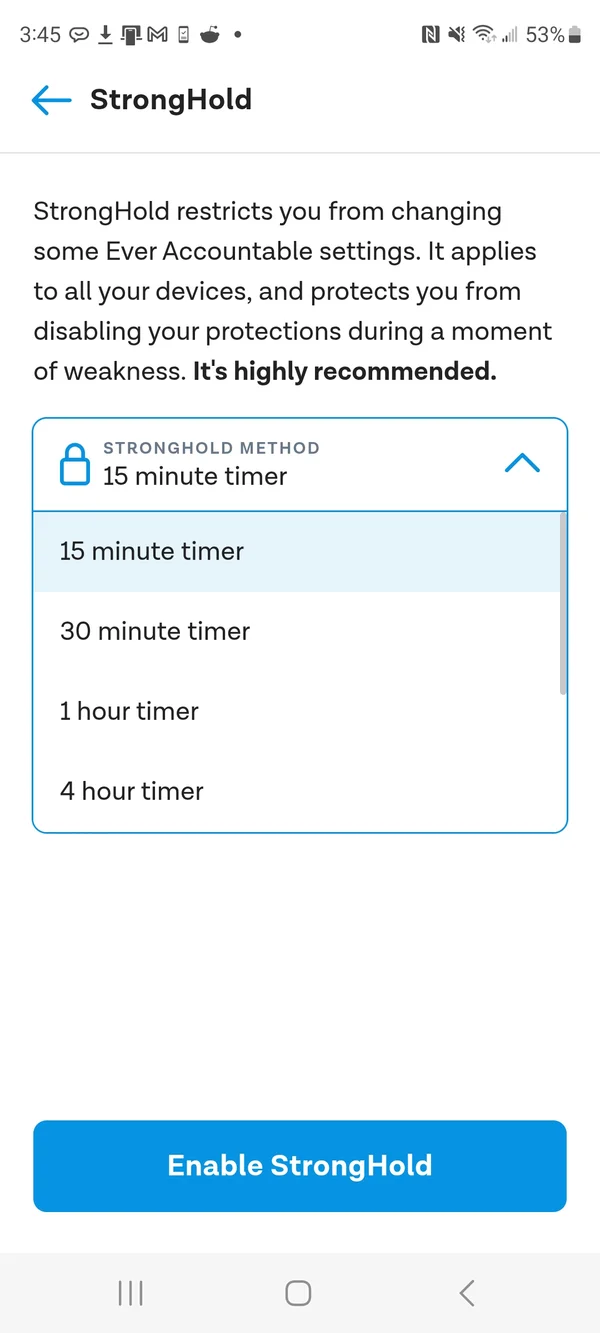
StrongHold locks your Ever Accountable settings so they can’t be changed without first going through an unlock process. That creates a “paper trail.” Your accountability partner will know. That’s the whole point.
How to turn on StrongHold:
- Open Ever Accountable and tap Settings (bottom-right corner)
- Tap “StrongHold: The Settings Lock”
- Choose your protection level and follow the prompts to lock
- Scroll down on the right for two PIN options to unlock Stronghold
2. Content Blocking: empower yourself to stop accessing explicit content in a weak moment
Here’s the painful truth about most accountability tools. They catch you after the fact. You then have to face a raw conversation with your accountability partner. Yes, that pain does lead to growth. However, in the early stages of recovery, too many slip-ups can lead to more shame and hiding, even when you have a supportive accountability partner. And temptations are everywhere online.
Content Blocking flips the script on shame’s power quickly.
Powered by on-device AI, it detects and blocks sensitive or explicit material before it appears on your screen based on the protection level you choose. This wall of protection helps clean up your personal viewing habits online where willpower has failed you. You can enjoy clean reports right away. Quick wins start rewiring your brain to pursue healthier online habits.
The Content Blocking feature also empowers and supports parents who give their young teens access to online devices.
How to set up Content Blocking on Ever Accountable for Android
- Open Ever Accountable and tap Settings
- Tap Content Blocking
- Select your protection level
Understanding your Content Blocking options
Strict Blocking: This is the highest level of protection. It blocks sexual content, nudity, and immodest clothing such as swimsuits and exercise clothes.
Example: A swimsuit photo on a retail website, fitness models in workout attire, or suggestive social media images would be blocked. This option is recommended for new users or those who prefer stricter filtering.
Normal Blocking: This setting blocks sexual content and nudity but allows general, non-explicit content. It provides a balanced level of protection while maintaining flexibility.
Example: Explicit adult content and nude images would be blocked, but standard clothing ads, fitness apparel, or swimsuit product listings would typically remain accessible.
No Blocking: This option does not block any content. Nothing will be filtered, but activity may still be monitored or reported.
Show Accountability Notification Dot: Toggle on if you would like a small dot to display when concerning content is detected.
Test Mode (Block images of Dogs): Toggle on if you would like to test blocking by searching for “Dog Images”. Please disable after testing.
If your Content Blocking settings are not working as expected, please contact us at support@everaccountable.com, and our team will be happy to assist you.
3. App Management: more accountability options for modern life
Our old App Configuration on Android gave you fewer choices (You could whitelist certain apps for work). But real life isn’t that simple. Some apps need monitoring. Some need filtering. Some need to be unmonitored for work.
Ever Accountable’s upgraded App Management (for Android only) gives you three precise controls for every app on your device:
- Share Activity: The app’s usage shows up in your weekly accountability report, nothing hidden.
- Filter this App: AI actively filters inappropriate content within the app, not just around it
- Block this App: Full stop. No access. No temptation.
How to manage your apps:
- Open Ever Accountable and tap Settings.
- Tap App Protection & Configuration.
- Select any app and choose your level of control.
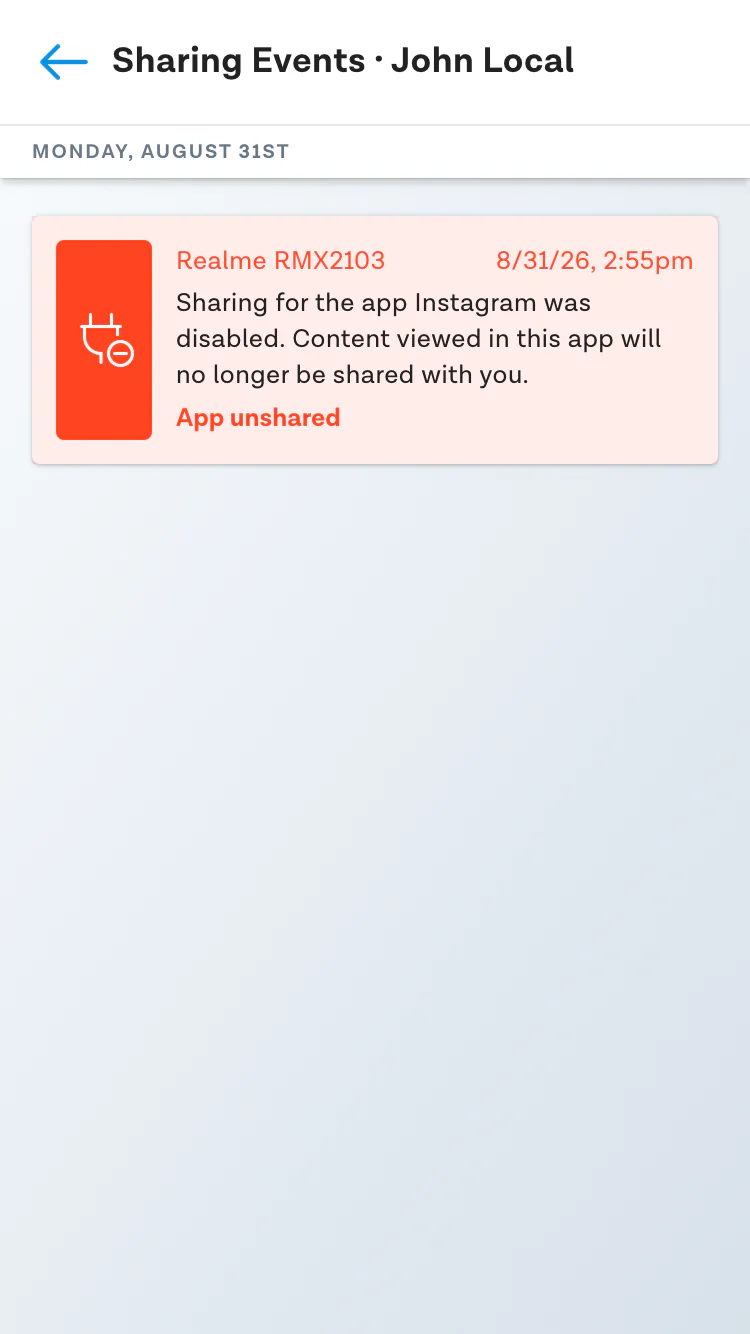
We still hold you accountable for any setting or app management changes you make. For example, if you choose to no longer share app activity on Instagram, then your accountability partner will be notified on the report.
Accountability on Android in 2026 deserves more powerful protections and more choices combined for our rapidly changing world.
How to Install Ever Accountable On Your Android Devices
Getting started is easy! Please follow the simple steps below.
Open Google Play app store. Search for Ever Accountable.
-
Click “Install” Ever Accountable on the app information page.
-
Click the “Open” button once the app has been installed.
-
Begin registration by entering an email address and creating a password or signing in with Google.
Don’t forget to agree to the terms of service.
Add an accountability partner(s)
Accountability simply does NOT work without a partner. So, let’s get off to a great start by choosing at least one partner. (Multiple accountability partners – friends supporting friends – is even better.)
When you reach out to someone, they’ll get an email or a text from you asking them to be your partner. Inside that email or text is a SPECIAL partner link that allows them to sign up for free.
Choose your level of Accountability.
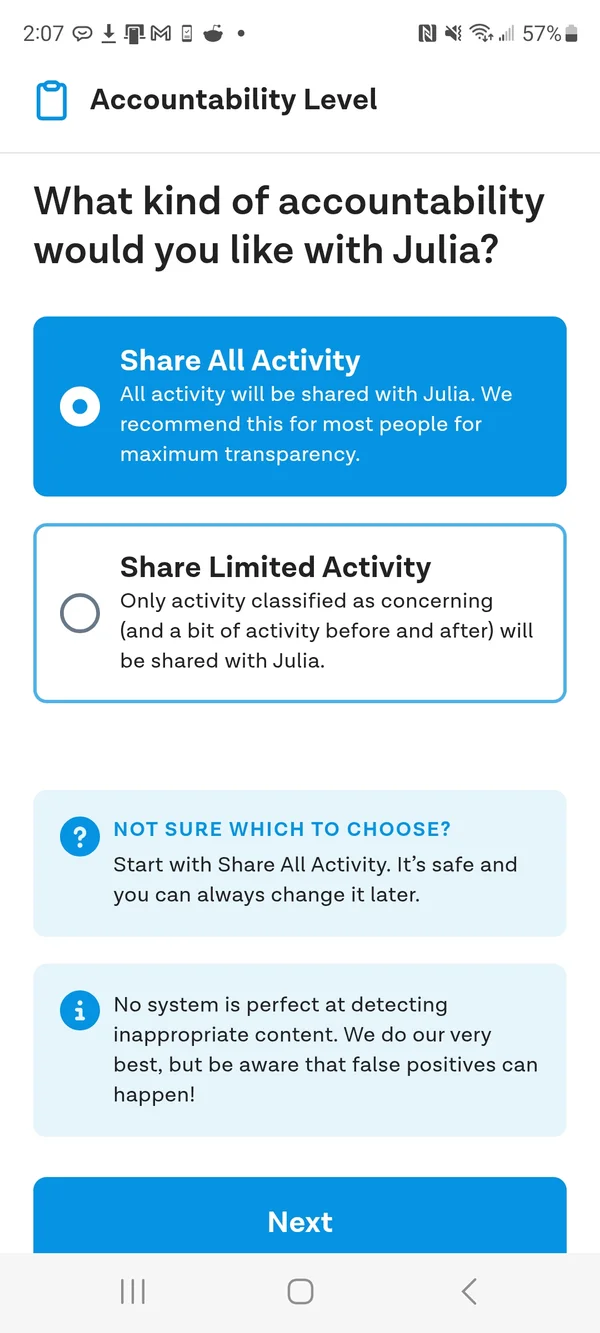
That’s it — your Android device is protected. To cover the rest of your devices, see How To Add A New Device To Your Account below.
How To Maximize Accountability on Android
Enable Screenshots for added protection from porn
This is an optional feature. Enabling Screenshots will allow Ever Accountable to take periodic screenshots of your activity on the screen. These screenshots are included in your weekly accountability report.
How to enable screenshots:
-
Open the Ever Accountable app and click the “Settings” icon.
-
Click “Turn Screenshots On” under the “Device Settings” section.
-
Click the blue “Activate Screenshots” button.
-
To adjust the Screenshot Resolution Quality.
-
Click the Screenshots feature one more time and pick between Blurred and No Blur.
-
Blurred: This is the default setting. When selected, we will give the screenshots a blur effect.
-
No Blur: This is a higher resolution screenshot.
How to disable screenshots for privacy purposes
- Open the Ever Accountable app and click the “Settings” icon.
- Click “Turn Screenshots Off” under the “Device Settings” section.
- Toggle the Screenshots setting to the “off” position.
- Select how long you want the Screenshots feature to be disabled, and then enter the reason why you are disabling Screenshots.
*Note*: The reason you enter will be shared with your accountability partners on your weekly accountability report.
How To Add A New Device To Your Account
Open this link on any new device you want to register.
Scroll down, find the platform appropriate for your Android device, and CLICK on that icon
Download the app on your device and follow the log-in instructions. Please use your current log-in information.
If you need help, please contact us: support@everaccountable.com
Tip: If you need detailed installation steps, click on the “Installation FAQ” link alongside each download option
Social Media: Help to Stay Accountable
We can help you with social media accountability inside popular social media apps.
App Configuration Steps:
-
Open the app and go to the Settings tab
-
Select App Configuration
-
Check to see what apps are on the list.
-
Tap Individual App Sharing & Blocking. Note that Ever Accountable will automatically share each app. Tap on any app to UNCHECK Sharing or Filtering or to BLOCK that app. Be sure to click “Confirm” to save your choice.
Please reach out to us at support@everaccountable.com with any questions.
What happens if app sharing is disabled?
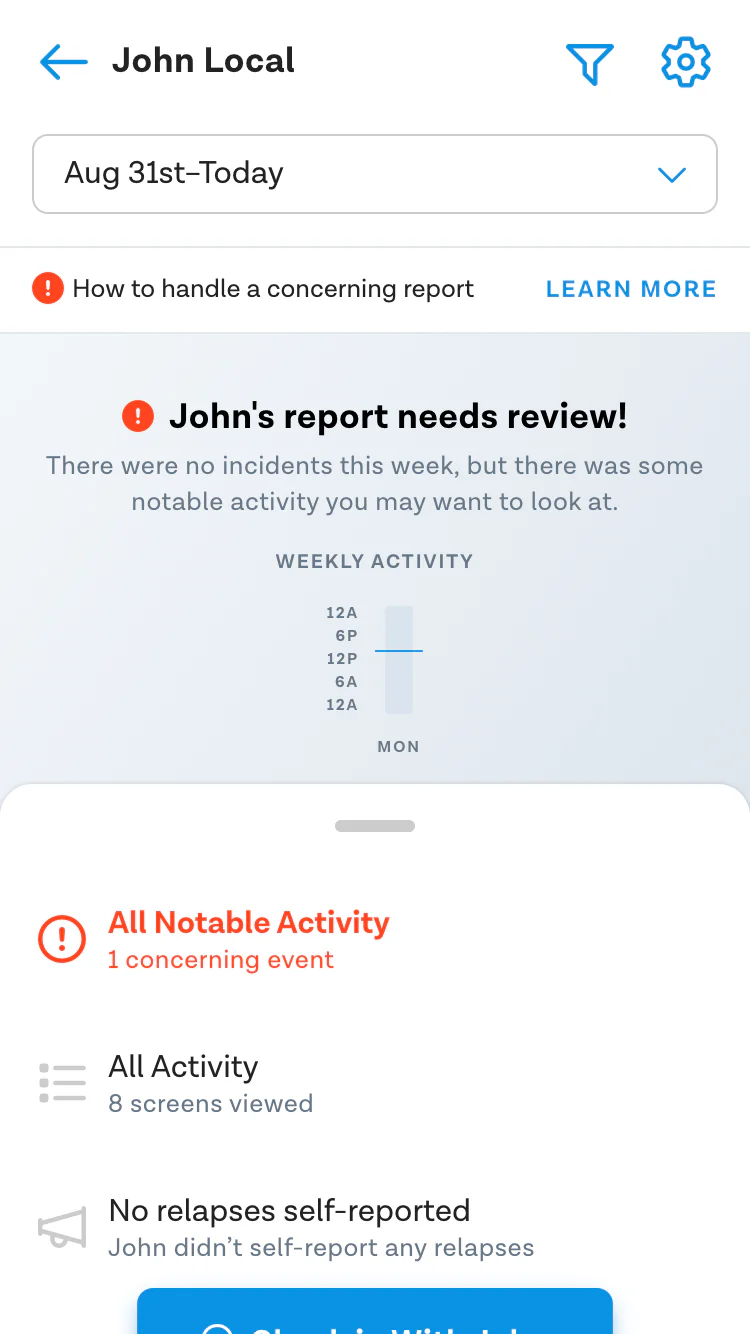
The accountability partner will receive notification in the reports saying something like “John’s report needs review!”. It’s important to click through to the notifications to see what changes may have been made in the settings.
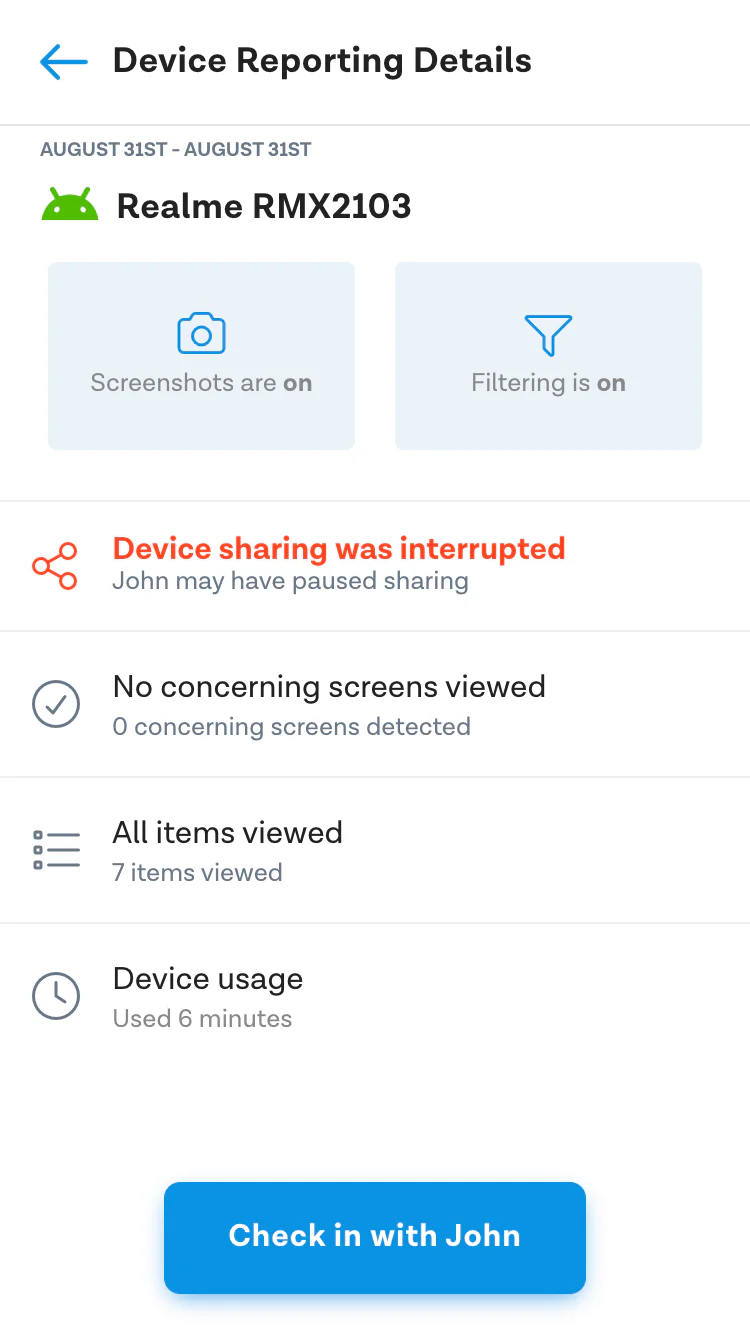
Click on the notification for the specific details. You will see which app may need to be enabled in the App configuration settings again. Depending on the situation, reach out to the person you are supporting to find out what happened.
Tips For Accountability Partners (we think you’re AMAZING)
Congratulations! Your friend or family member trusted you enough to ask you to be their accountability partner. You will have received an invite via email or text. If you are a current Ever Accountable customer also, you will sign in with your normal password. If you are simply an invited accountability partner (not a current customer), you need to accept the invite, so that you can activate your free accountability partner account. You should not be asked to pay. If that happens, reach out to support@everaccountable.com for help right away. You are AMAZING, and we appreciate you deeply.
Here’s a link to a blog post to encourage you and give you helpful tips. We’re also here to help you if you have any questions or need tech help.
Troubleshooting in Android
Over the long haul there is chronic *bug* inside of Google (not Ever Accountable) that rarely *bugs* us. Sometimes it may affect certain Android devices.
We’re always working on a work-around for this bug.
Please contact us at support@everaccountable.com if you encounter a problem.
3 Amazing Benefits of Using Ever Accountable For Android Porn Protection
1. Rewire your brain to reach for something better than pornography.
Any bad habit takes practice to break. By using the Ever Accountable app, you can train your brain to recover from porn. Accountability is key.
We help you be honest and intentional about owning online viewing habits. Porn thrives in secrecy. You can find your own power and ultimately freedom, by breaking the silence!
When you’re able to refocus on your life goals and reach for your potential, uninhibited by the trappings of pornography, it feels amazing.
Even better, accountability helps you begin reconnecting with the people around you on your life’s journey. Life is too short and precious to let it be hijacked by hours and hours on a screen.
2. Rebuild trust in your relationship with your spouse.
“I’m so glad I found this (Ever Accountable). I had allowed pornography back into my life suddenly a few times over the course of a year or two, and it took a huge toll on my marriage. This is helping strengthen and rebuild trust with my wife. ~ Joshua M.”
While it’s often helpful to have an accountability partner other than your spouse, including your spouse in the accountability process demonstrates a commitment to honesty.
A clean report from Ever Accountable is a measurable, tangible sign of progress and commitment to rebuilding trust.
3. Model accountability and mentor the next generation.
If you’re a parent, our app will help you practice responsible digital parenting, too. Let’s normalize online accountability for future generations.
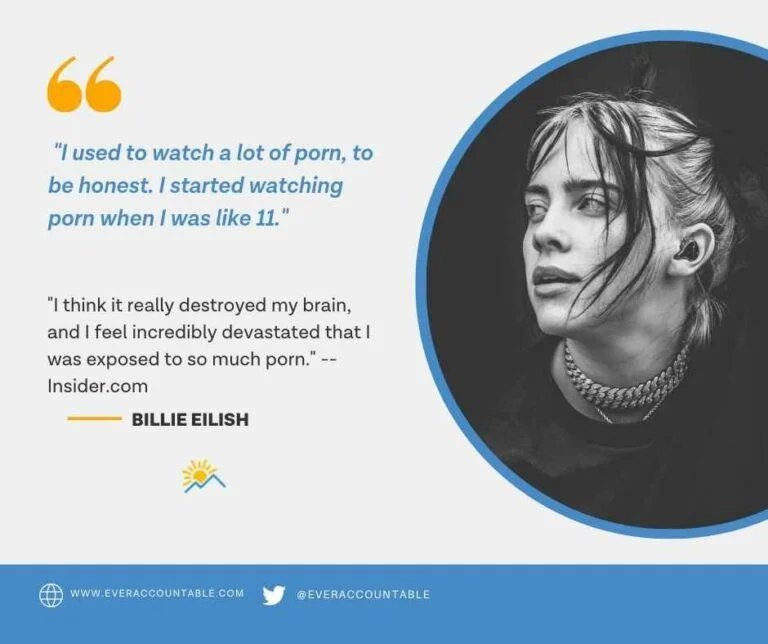
We’ve never had a generation of children more exposed to pornography than our current one – raised on porn! The effects of pornography on our children have yet to be measured.
In fact, many high school students consider porn use and OnlyFans normal. It’s time to create a new “normal” that doesn’t include porn.
When you lead by example, you’re building a better tomorrow. Accountability is a timeless principle. It never goes out of style in healthy relationships.
Ultimately that’s our goal. We want to empower you and those you love to live above pornography AND reach your highest potential. Please feel free to reach out to support@everaccountable if you have questions or need help with our app.
We’re here for you!
Frequently Asked Questions
What is Ever Accountable and how does it work on Android?
Ever Accountable helps you be accountable to a friend or mentor for your online activity while also providing online safety features like optional content blocking. On Android, it tracks app usage, takes optional AI-analyzed screenshots, and sends weekly reports. If explicit content is detected, your partner is alerted. Partners sign up free.
What are the 3 new Android features Ever Accountable added in 2026?
Ever Accountable’s 2026 Android update introduced StrongHold (a settings lock that prevents protections from being quietly disabled), Content Blocking (AI-powered blocking of explicit content before it loads, with Strict, Normal, and No Blocking levels), and App Management (per-app controls to share activity, filter content, or block access entirely).
What is StrongHold and why does it matter?
StrongHold locks your Ever Accountable settings so they can’t be changed without going through an unlock process first, and your accountability partner is notified when it happens. It was built specifically for weak moments when the temptation to bypass the app is highest. To enable it: Settings → “StrongHold: The Settings Lock” → choose your protection level.
What is Content Blocking on Ever Accountable for Android?
Content Blocking uses on-device AI to detect and block explicit or sensitive material before it appears on your screen. Unlike standard accountability tools that report after the fact, Content Blocking stops content at the source. Three protection levels are available: Strict (blocks nudity and immodest clothing), Normal (blocks explicit content only), and No Blocking (monitoring only). To set it up: Settings → Content Blocking → select your protection level.
Is Ever Accountable free for accountability partners?
Yes. Partners receive a free account through a special invite link sent via email or text. They should never be asked to pay. If payment is requested, please contact support@everaccountable.com.